

- 资源介绍
- 更新记录
- 安装教程

RIPRO主题美化-登录注册框动态美化添加SVG登录特效(张嘴特效)
不带后台直接下载替换,带后台开关的按照下面教程走
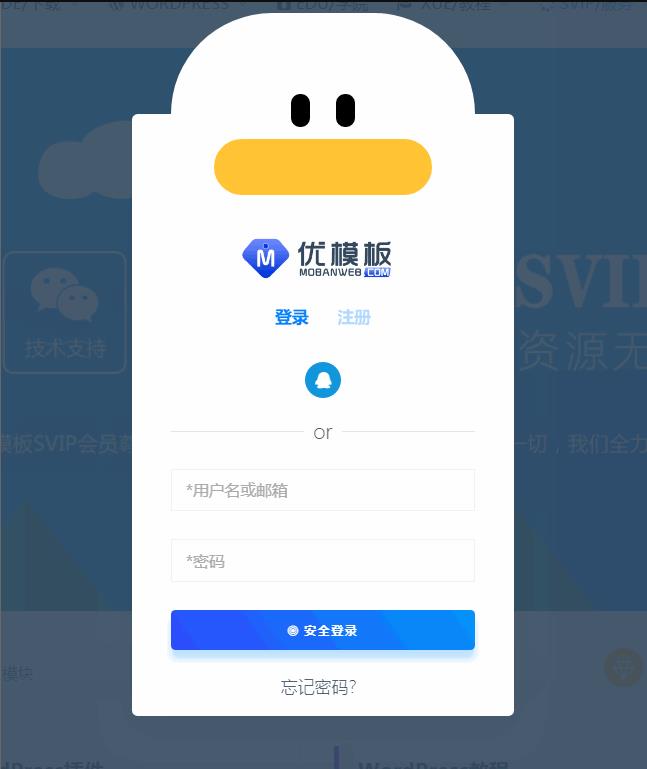
1、找到/wp-content/themes/ripro/parts/popup-signup.php 文件并找到以下代码
<!–登录页大嘴SVG特效开始–>
<!–<?php if (_cao(‘xinghai_login_yazui’)) : ?> –>
<div class=”main-login”>
<div class=”monster”>
<div class=”monster__face”>
<div class=”monster__eyes”>
<div class=”monster__eye”></div>
<div class=”monster__eye”></div>
</div>
<div class=”monster__mouth”>
<div class=”monster__top”></div>
<div class=”monster__bottom”></div>
</div>
</div>
</div>
</div>
<?php endif; ?>
<!–登录页大嘴SVG特效结束–>
2.后台控制开关代码,添加到你想要添加的后台开关位置
// 开启登录鸭嘴动效
array(
 'id' => 'xinghai_login_yazui',
'type' => 'switcher',
'title' => '开启登录鸭嘴特效',
 'default' => true,
),
3、找到diy.css把下面代码复制进去并保存
/*登录页大嘴SVG特效开始*/
.main-login {
display: flex;
justify-content: center;
align-items: flex-end;
position: relative;
margin-bottom: 100px;
margin-top: -105px;
}
.monster {
display: flex;
justify-content: center;
position: relative;
width: 270px;
height: 90px;
border-top-left-radius: 200px;
border-top-right-radius: 200px;
background-color: #FFF;
}
.monster__face {
display: flex;
justify-content: center;
align-items: center;
flex-direction: column;
position: absolute;
top: 19%;
width: 75%;
height: 200px;
}
.monster__eyes {
display: flex;
justify-content: space-between;
width: 28%;
height: auto;
margin-bottom: 10px;
}
.monster__eye {
width: 17px;
height: 30px;
border-radius: 20px;
background: #000000;
}
.monster__mouth {
display: flex;
justify-content: center;
align-items: center;
position: relative;
width: 100%;
height: 0%;
overflow: hidden;
border: 25px solid #FFC333;
border-radius: 100px;
background-color: #810332;
animation: mouth 1.75s infinite;
}
.monster__mouth::before {
content: ”;
position: absolute;
width: 150px;
height: 80px;
border-radius: 100px;
background-color: #400018;
}
.monster__mouth::after {
content: ”;
position: absolute;
bottom: -80px;
width: 160px;
height: 80px;
border-top-left-radius: 50%;
border-top-right-radius: 50%;
background-color: #DC1B50;
animation: tongue 1.75s infinite;
}
.monster__top {
position: absolute;
top: -30px;
width: 170px;
height: 30px;
border-bottom-left-radius: 10px;
border-bottom-right-radius: 10px;
background-color: #ffffff;
z-index: 100;
animation: t 1.75s infinite;
}
.monster__bottom {
position: absolute;
bottom: 0;
width: 100px;
height: 30px;
border-top-left-radius: 10px;
border-top-right-radius: 10px;
background-color: #ffffff;
z-index: 100;
animation: b 1.75s infinite;
}
/**/
/**/
@keyframes t {
0%, 10%, 80%, 100% {
top: -30px;
}
20% {
top: 0px;
}
30% {
top: -20px;
}
40% {
top: -0px;
}
50% {
top: -25px;
}
70% {
top: 0px;
}
}
@keyframes b {
0%, 10%, 80%, 100% {
bottom: -30px;
}
20% {
bottom: 0px;
}
30% {
bottom: -20px;
}
40% {
bottom: -0px;
}
50% {
bottom: -25px;
}
70% {
bottom: 0px;
}
}
@keyframes mouth {
0%, 10%, 100% {
width: 100%;
height: 0%;
}
15% {
width: 90%;
height: 30%;
}
20% {
width: 50%;
height: 70%;
}
25% {
width: 70%;
height: 70%;
}
30% {
width: 80%;
height: 60%;
}
35% {
width: 60%;
height: 70%;
}
40% {
width: 55%;
height: 75%;
}
45% {
width: 50%;
height: 90%;
}
50% {
width: 40%;
height: 70%;
}
55% {
width: 70%;
height: 95%;
}
60% {
width: 40%;
height: 50%;
}
65% {
width: 100%;
height: 60%;
}
70% {
width: 100%;
height: 70%;
}
75% {
width: 90%;
height: 70%;
}
80% {
width: 50%;
height: 70%;
}
85% {
width: 90%;
height: 50%;
}
85% {
width: 40%;
height: 70%;
}
90% {
width: 90%;
height: 30%;
}
95% {
width: 100%;
height: 10%;
}
}
@keyframes tongue {
0%, 20%, 100% {
bottom: -80px;
}
30%, 90% {
bottom: -40px;
}
40% {
bottom: -45px;
}
50% {
bottom: -50px;
}
70% {
bottom: -80px;
}
90% {
bottom: -40px;
}
}
/*登录页大嘴SVG特效结束*/
猜你喜欢
-
一套公司企业WordPress主题模板 Verk – A Business WordPress Theme
2021-04-21 -
WordPress的tags标签自定义样式
2021-04-25 -
zibll子比主题 V5.1破解版WordPress主题+新增阿里云短信/腾讯云/短信宝/风吹雨短信接口
2021-04-24 -
add_settings_field( )函数
2021-04-26 -
zibll3-3破解版3去授权无限制亲测可用
2021-04-22 -
【WP采集插件】autopost-pro 3.7.8无限制wordpress自动采集插件源码
2021-04-24 -
WordPress 根据时间自动切换主题配图和颜色
2021-04-26 -
get_next_post()函数
2021-04-26 -
WordPress网址导航付费主题HaoWa1.3.1
2021-04-22 -
WordPress工单插件AIO Support Center中文版
2021-04-24
-
自制wordpress防简易CC攻击刷新跳转
2021-04-26 -
Arcane – 游戏社区网站模板WordPress主题 – v2.7.2
2021-04-24 -
网站右侧悬浮窗 在线客服简约图标
2021-04-25 -
JustnewsV4.0.4自媒体资讯主题WordPress主题
2021-04-21 -
我们应该在WordPress网站上使用“www”还是“非www”域名?
2021-04-26 -
WordPress如何在后台文章列表页添加款姐编辑特色图像功能
2021-04-24 -
Ripro数据转换Riplus插件
2021-04-24 -
WordPress5.42 最新正式中文版蓝奏云高速下载
2021-04-21 -
WordPress获取指定/当前分类目录的文章数量
2021-04-25 -
WordPress获取本周/今日/24小时内更新的文章数量
2021-04-25
猜你在找

常见问题FAQ
- 免费下载或者VIP会员专享资源能否直接商用?
- 本站所有资源版权均属于原作者所有,这里所提供资源均只能用于参考学习用,请勿直接商用。若由于商用引起版权纠纷,一切责任均由使用者承担。更多说明请参考 VIP介绍。
- 提示下载完但解压或打开不了?
- 找不到素材资源介绍文章里的示例图片?
- 大资源

- 2021-04-25Hi,初次和大家见面了,请多关照!
